Most blockchains are open and decentralized, and anyone can participate in mining. In a Proof-of-Work blockchain, the network is secured by solving mathematical problems and finding blocks. In return, miners who find a block receive coins that represent the energy spent mining. In other words, you are getting rewarded by the protocol itself for securing it.
Mining cryptocurrency requires an internet connection, hardware, and dedicated software (or ASICs). This guide walks through mining Nexa on Linux and Windows with a GPU.
What Is NexaPoW
Nexa uses a NexaPoW proof-of-work algorithm. Each hash attempt builds a candidate from the block header and a nonce by double-SHA-256, uses that hash as a private key, signs SHA-256 of that same hash with Schnorr, and hashes the signature. The accepted block is the one whose final hash falls below the network target. The Schnorr signing step is the workload, which is why GPUs are far more efficient than CPUs on this algorithm.
Mining is how new Nexa is created and how the network stays secure. Your GPU runs the NexaPoW algorithm, finds valid blocks, and earns the block reward.
Requirements
- Internet connection.
- Nexa wallet address (not exchange address, you can generate one in the official Nexa Full-Node wallet).
- A supported GPU. NVIDIA Pascal (GTX 10-series) or newer, and AMD GCN/Polaris (RX 400/500), Vega, Radeon VII, RDNA / RDNA2 / RDNA3, and RX 9000 series.
- Linux or Windows machine.
Mining on Pool
Pool mining combines the hashrate across many miners and pays you proportionally, smoothing out the variance of solo mining. Values verified against each pool’s own help page as of May 2026.
| Pool | Stratum endpoint | Fee | Min payout | Registration | Source |
|---|---|---|---|---|---|
| 2miners | nexa.2miners.com:5050 | 1% PPLNS | 50,000 NEXA | None, wallet is the worker | help |
| WoolyPooly | pool.eu.woolypooly.com:3124 | 0.9% PPLNS | Configurable per wallet | None | help |
| Kryptex | nexa.kryptex.network:7026 | 3% PPS+ / 1% SOLO | 20,000 NEXA | None for wallet mining | help |
| F2Pool | nexa.f2pool.com:3400 | 1% PPLNS | 50,000 NEXA | Required (account, not wallet) | help |
A few notes worth knowing:
- 2miners, WoolyPooly, and Kryptex use the wallet address directly as the username. F2Pool is different. The --user field is account_name.worker_name, and the payout address is configured separately in your F2Pool dashboard.
- Kryptex uses a / separator in the username for Rigel, lolMiner, and WildRig (WALLET/WORKER), and a . separator for BzMiner (WALLET.WORKER). Mixing them silently fails.
- 2miners, WoolyPooly, and Kryptex offer regional endpoints (e.g. us-nexa.2miners.com:5050, pool.us.woolypooly.com:3124, nexa-eu.kryptex.network:7026); pick the one closest to you.
- SSL/TLS variants exist for all four pools. 2miners uses ports 15050 (GPU, share-diff 1) and 15151 (Nicehash, share-diff 8), Kryptex uses 8026 (the older 7777/8888 pair is deprecated and being retired). Check each pool’s help page if you need an encrypted stratum.
Download a GPU Miner
Four GPU miners support NexaPoW. All four ship official Linux tarballs and Windows ZIPs.
| Miner | Best for | Source |
|---|---|---|
| lolMiner | NVIDIA + AMD (Pascal+, Polaris+, Vega, RDNA, RX 9000) | github.com/Lolliedieb/lolMiner-releases |
| Rigel | NVIDIA only | github.com/rigelminer/rigel |
| BzMiner | NVIDIA + AMD | github.com/bzminer/bzminer |
| WildRig Multi | NVIDIA + AMD | github.com/andru-kun/wildrig-multi |
Always download from the publisher’s release page.
- Linux: download the .tar.gz file, then extract with tar xf.
- Windows: download the .zip and extract it anywhere (avoid Program Files; Defender is stricter there).
AMD Polaris (RX 400/500) support was added to lolMiner in version 1.71. Vega and Radeon VII were supported earlier but still require HSA/ROCm-based drivers.
Start Mining on Windows
Extract the ZIP to your hard disk. In the miner folder, Open Windows Notepad, copy/paste the following text, save the file as start-mining.bat in the same folder. (remember to change “Save as type” to “All files” otherwise it will save the file as a text file)
create start-mining.bat:
@echo off
lolMiner.exe --algo NEXA --pool nexa.2miners.com:5050 --user nexa:YOUR_ADDR.%COMPUTERNAME%
pause
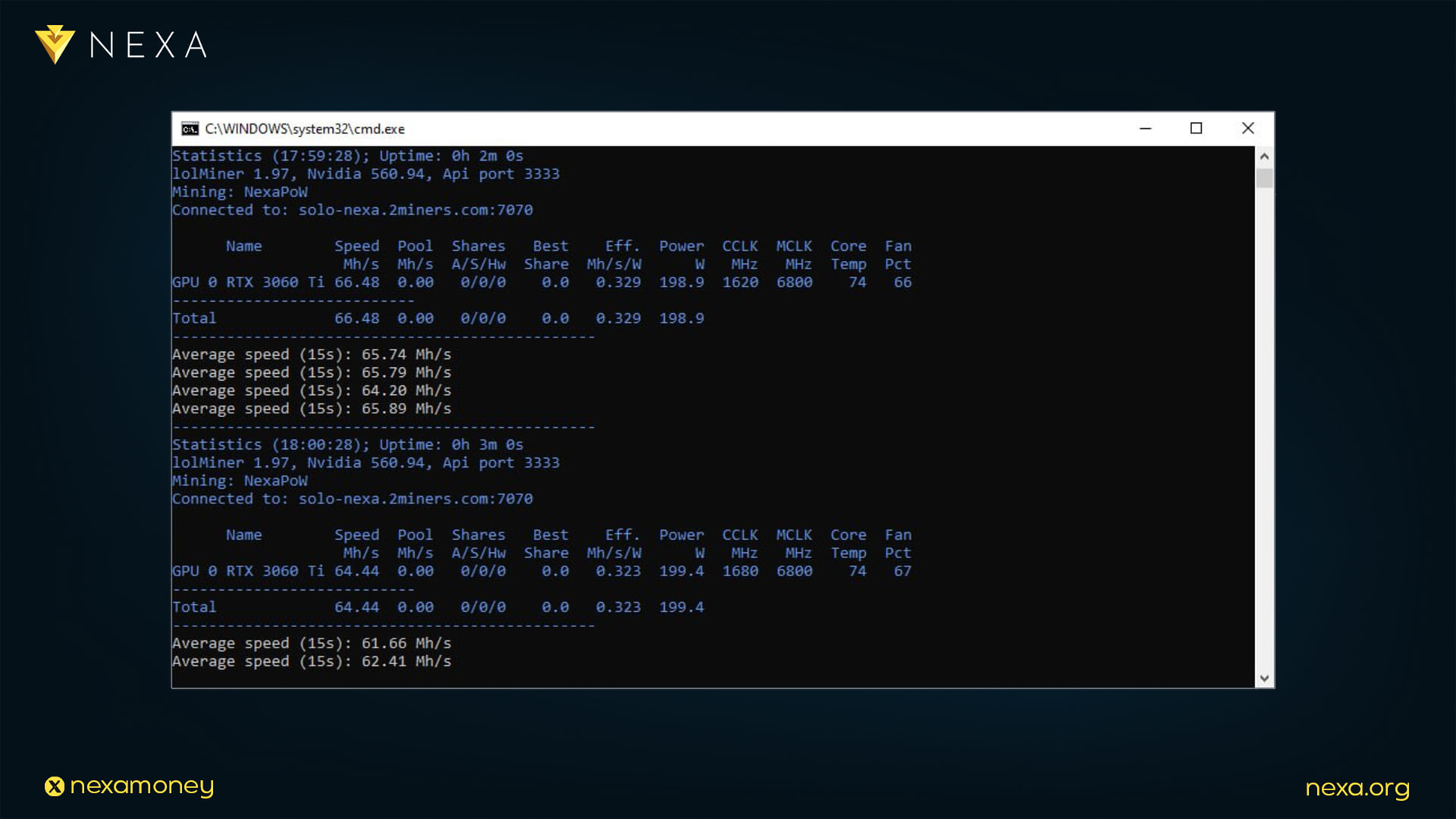
Double-click to start. The console window shows hashrate and shares.
Windows Defender flags GPU miners as PUA. This is a false positive: the same binary patterns are reused by drive-by malware. Add a folder exclusion in Windows Security → Virus & threat protection → Manage settings → Exclusions, or pick a folder Defender ignores. On Windows 11, also disable Reputation-based “Potentially Unwanted App” protection.
Start Mining on Linux
Open a terminal, cd into the miner folder, and run:
./lolMiner --algo NEXA --pool nexa.2miners.com:5050 --user nexa:YOUR_ADDR.YOUR_RIG_NAME
Replace YOUR_ADDR with your payout address and YOUR_RIG_NAME with any label (e.g., home-rig). Rig name is optional; on 2miners, it is limited to 32 characters of letters, numbers, -, and _ (other pools have their own rules, e.g., F2Pool allows 1–15 alphanumeric characters with no dot or underscore). The console shows hashrate and accepted shares. Ctrl+C to stop.
To make it reusable, save as start-mining.sh:
#!/usr/bin/env bash
cd ~/lolMiner
./lolMiner --algo NEXA --pool nexa.2miners.com:5050 --user nexa:YOUR_ADDR.$(hostname)
Then chmod +x start-mining.sh and run ./start-mining.sh.
Check Rewards
Open your pool dashboard. For 2miners:
https://nexa.2miners.com/account/your-wallet-address
It shows live hashrate, unpaid balance, and payout history. Payouts trigger automatically once the threshold is reached (50,000 NEXA for 2miners). Nexa’s coinbase maturity rule requires 5,000 blocks (~7 days) confirmations before mined coins are spendable.
Common Issues
A few problems come up often enough to mention up front:
- Pool produces 0 shares: the stratum endpoint, port, or worker string is incorrect. Cross-check the pool’s “How to mine NEXA” page and watch for the / vs.. separator on Kryptex.
- Miner reports accepted shares, but your address doesn’t appear on the pool dashboard: it’s almost always a typo in the wallet address. Nexa’s address format is checksummed, so a corrupted address won’t be accepted, but a valid address that isn’t yours will route mining credit to its owner. Make sure that the address you pasted matches the one in your wallet.
- Hashrate on the pool dashboard is much lower than what the miner reports locally: pool-side hashrate is calculated from submitted shares and can take 10 to 30 minutes to stabilize after start-up. If it doesn’t converge after an hour, something is wrong, usually the wrong endpoint or a stale miner build.
- Windows Defender or any other antivirus deletes the miner: add a per-executable exclusion. On Windows 11, also disable Reputation-based Potentially Unwanted App protection, since the same binary signature is reused by drive-by miner droppers.
- Miner cannot connect to pool: check Windows Firewall and if necessary add the appropriate rule to allow the miner executable file to connect to the internet (for example lolminer.exe).
Tips and Tricks
- Since mining requires a lot of processing power from your graphics card, it will generate heat. During the initial startup phase, it’s important to monitor your GPU temperature. This value is displayed in your mining software’s window. A value around 75°C is usually considered normal. If it’s above 80°C, it’s too high and you’ll need to make changes to your start-mining.bat file
- Make sure your computer’s fans and grills are clean to allow your graphics card to dissipate heat properly.
- Windows usually puts your computer to sleep when you’re not using it. This stops mining. Configure your power options to keep your computer awake.
Conclusion
Joining the network and starting mining are not complicated tasks, even though they might look so at first glance. This guide covered the mining process in a couple of simple steps, and now you can help to secure the network and start earning Nexa coins directly from the protocol.
If you still have any questions, please join our community groups and channels and feel free to ask for help.
Nexa Main Telegram: https://t.me/nexacoin
Nexa Mining Telegram: https://t.me/nexa_mining
Nexa Discord: Nexa