
Wally Wallet has had a very special feature for quite some time, and it is time to review it. Any peer-to-peer trade can be made directly in the Wally Wallet, exchanging Nexa coins for tokens or NFTs. This feature creates a decentralized exchange model without an exchange itself, working with no smart contracts or other dependent platforms.
Peer-to-Peer Offers
This model enables trading in any asset on Nexa without any intermediaries, exchanges, marketplaces, or escrow services. Holding assets in Wally Wallet lets you create a sell order to exchange them for Nexa coins. It means that all tokens and NFTs in your wallet can be sold to anyone by simply sharing a generated QR code when creating an offer.
Once the offer is created, you can copy and send the QR code, which is a trade proposal, to any other party, a friend, or even upload it to a social media platform. Anyone with an active Wally Wallet can scan this QR code and take your offer to buy the asset, tokens, or NFTs.
Once scanned, a new screen in Wally Wallet will appear, showing what you will actually get for the exchange. For example, if you are buying an NFT, you will see exactly which NFT it is and how many Nexa coins it costs, and you can still approve or deny the offer once you see the exact offering.
If the offer is approved, it means a trade is successful, and the purchase is completed. The only thing you need to participate in these trades is Nexa coins and assets that you want to exchange.
Sell In Three Steps – Buy In One
In your Wally Wallet assets tab, you see all your tokens and NFTs that you have in your wallet. Clicking on them opens a new tab, where you will find the sell icon, a button. Clicking it will open an offer screen where you can enter any price in Nexa coins and confirm. Your offer with a link and QR code will be created just like that, and you can share it anywhere, on social media, send it to a friend, or even print and hang it on a pole. Wally Wallet Peer-to-Peer Offers do not require any third-party intermediaries or platforms; they depend solely on you.
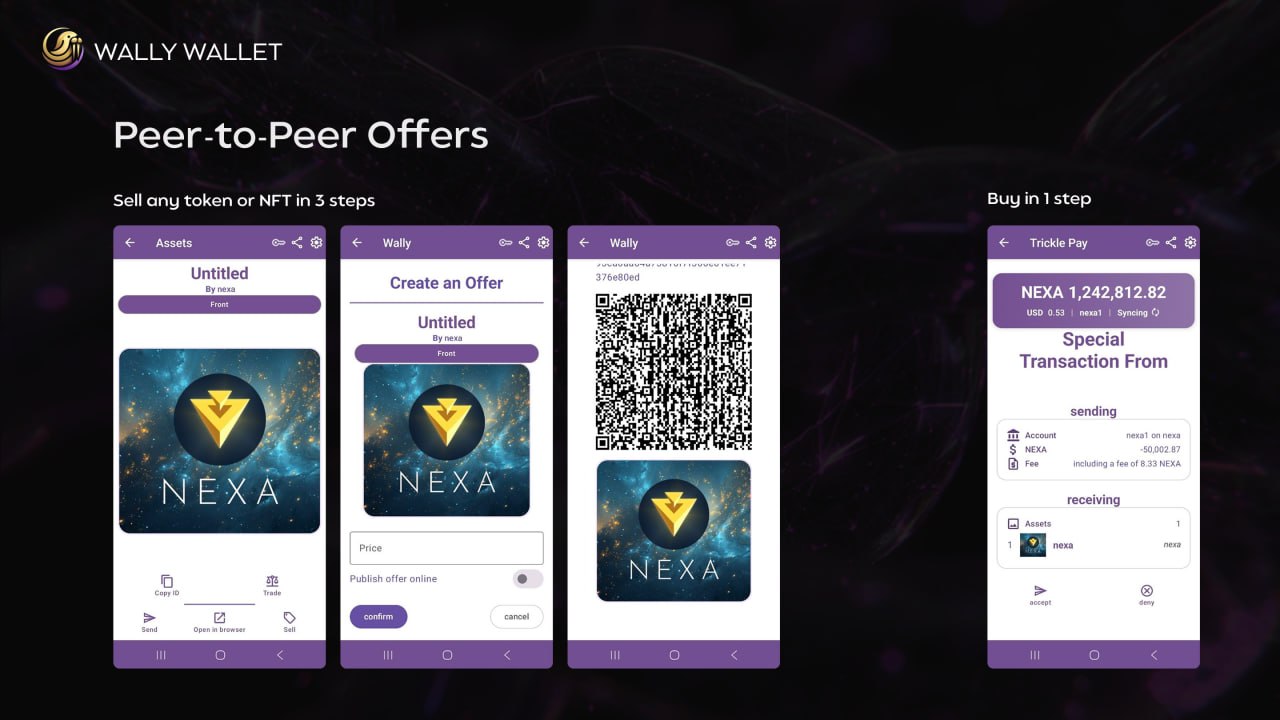
Let’s review how it’s done in detail. All assets have a sell button on their detail page, and it opens the Create an Offer screen:
-
For a fungible token, you enter how many you’re selling.
-
You enter your price in NEXA.
-
Tap Confirm.
Simple as that. Wally builds the offer and gives you a link with a QR code; that code is a trade deal in itself. Anyone with a Wally Wallet who scans this QR code will see an asset and the price at which it is being offered, and can confirm or deny the offer.
Two honest details worth knowing:
-
The offer lives while the screen does. While the QR is showing, the coins behind it are reserved so your wallet can’t accidentally spend them out from under the deal. Walk away and tap back, and the reservation is instantly released.
-
Your wallet is watching for the trade. The moment the buyer’s transaction hits your wallet, the screen announces Purchase Complete! and takes you home.
The buyer scans the QR (or opens the offer link). Wally recognizes it and shows a permission screen that spells the trade out from their side: what they will receive, what they will pay, and the network fee. A stranger’s QR code cannot skip the approve screen, and scanning with a wallet is safe.
The result is a single on-chain transaction that includes both sides of the trade. A transaction is atomic by nature: either it’s valid, and everything happens asset to buyer, payment to seller- or it’s invalid, and nothing happens. There is no moment where the buyer has paid but not received, or the seller has shipped but not been paid. The blockchain itself is the escrow, and it charges nothing extra for the privilege.
Try It Now
The philosophy is that anyone should be able to trade what they own, and Wally Wallet enables that. The feature is live, and you can already try it now. Have an NFT? Trade it with a friend, other Nexa community members, or test it out and share your feedback.
Wally on Android:
https://play.google.com/store/apps/details?id=info.bitcoinunlimited.www.wally
Wally on iOS:
https://apps.apple.com/us/app/wally-nexa-wallet/id6469619075